What Is a CRM and Why Does Your Medical Practice Actually Need One
Automation & Systems
Most medical practices are running on a combination of phone calls, sticky notes, front desk memory, and whatever their EHR happens to track.
That works — until it doesn't.
A new patient calls, gets voicemail, and never hears back. A follow-up falls through the cracks. A patient who was almost ready to book just needed one more touchpoint and never got it.
This is what a CRM is built to prevent.
What a CRM Actually Is
CRM stands for Customer Relationship Management. In a medical practice context, think of it less as software and more as a system that tracks every patient interaction — from the first inquiry to the ongoing relationship — and makes sure nothing falls through the cracks.
It is not your EHR. Your EHR manages clinical records. A CRM manages the communication and relationship side of your practice — the part that determines whether a potential patient becomes an actual patient, and whether an existing patient stays engaged.
Where Practices Lose Patients Without Realizing It
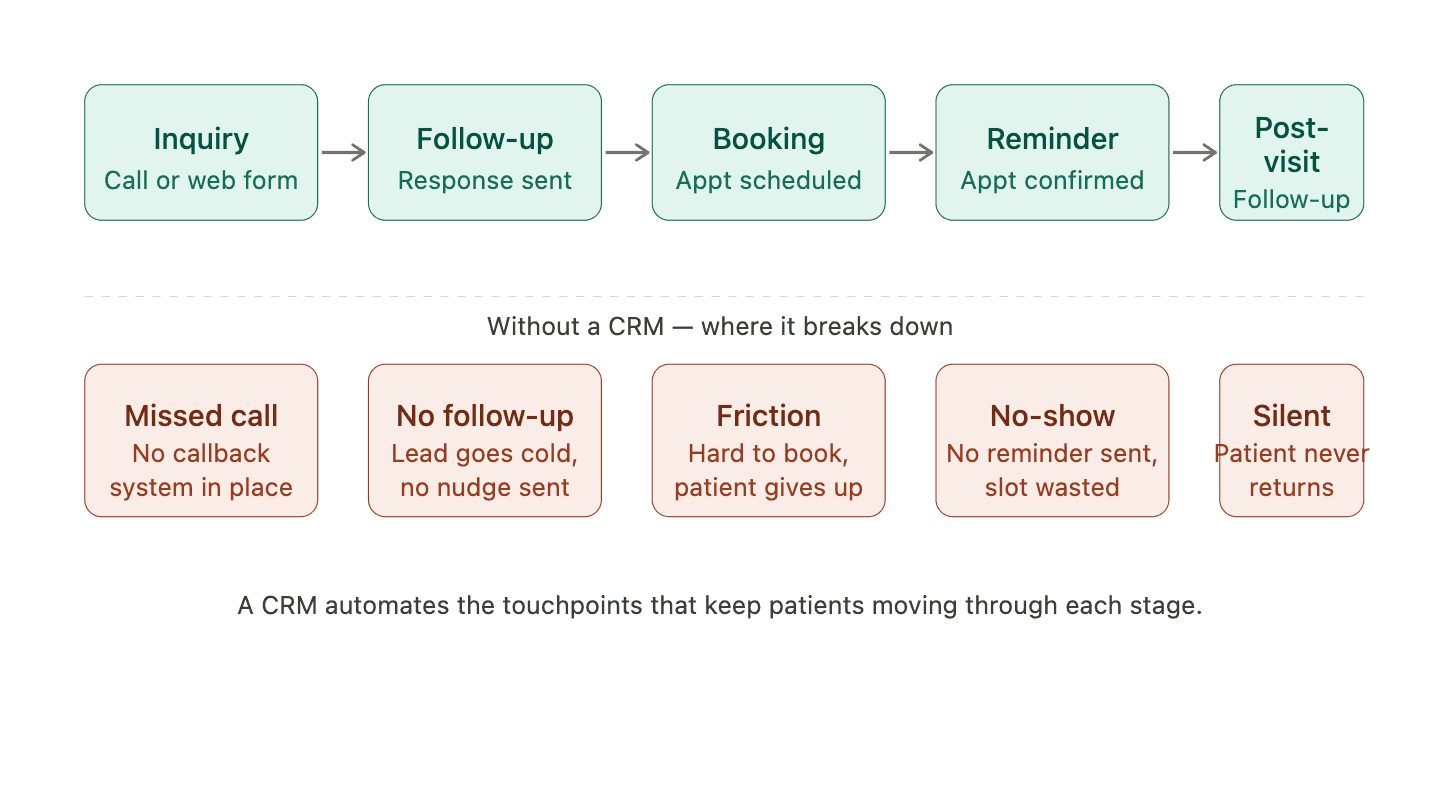
"Most practices aren't losing patients because of bad care. They're losing them in the gaps between touchpoints — the missed call, the unreturned inquiry, the appointment that never got confirmed."
What a CRM Does at Each Stage
Stage | Without a CRM | With a CRM |
|---|---|---|
New inquiry | Relies on front desk to follow up manually | Automatic response sent within minutes |
Lead follow-up | Falls through if staff are busy | Automated sequence keeps the lead warm |
Booking | Phone tag, friction, drop-off | Online booking link sent automatically |
Appointment reminder | Manual call or nothing | Automated text and email reminders |
Post-visit | No follow-up unless staff remembers | Automated check-in and review request |
The Five Things a CRM Does for a Medical Practice
1. Captures Every Inquiry
Whether a potential patient calls, fills out a web form, sends a message through your website chat, or comes in through a social media ad — a CRM captures the lead and makes sure it doesn't disappear into a spreadsheet or a sticky note.
No more dropped inquiries. No more "I think someone called about that last week."
2. Automates Follow-UpMost practices lose potential patients not because of a bad first impression but because of no second impression. A patient calls after hours. No one answers. They get voicemail. If there's no automated follow-up — a text, an email, a callback trigger — there's a good chance they've already booked somewhere else by morning. A CRM sends that follow-up automatically. Our automation and CRM work is built around exactly this kind of gap. | 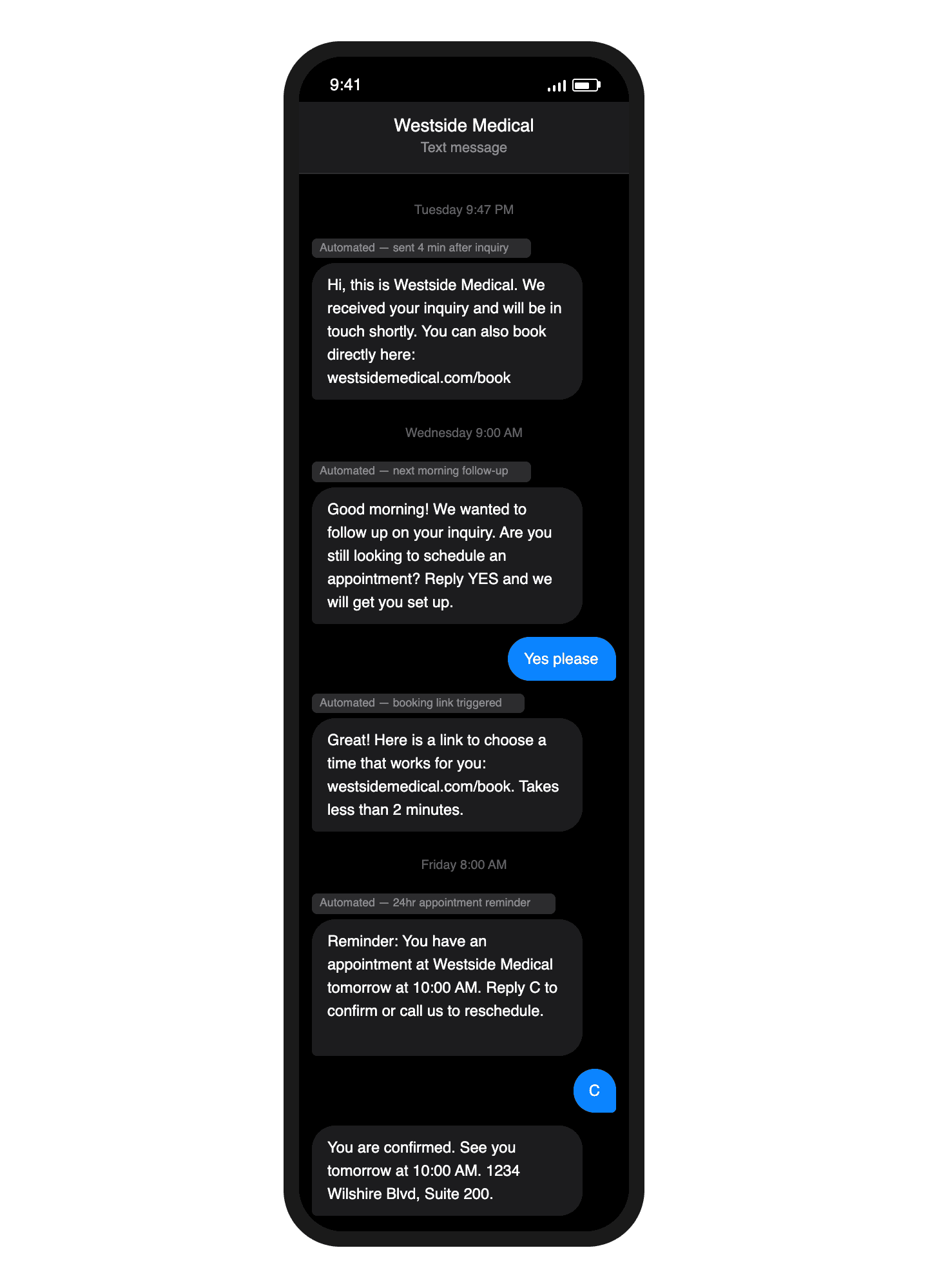 |
|---|
3. Reduces No-Shows
Appointment reminders sent automatically by text and email are one of the highest-ROI things a medical practice can implement. No-shows cost practices real revenue — and most of them are preventable with a simple automated reminder sequence.
A CRM handles this without anyone on staff having to remember to do it.
4. Requests Reviews at the Right Moment
The best time to ask a patient for a Google review is right after a positive visit — when the experience is fresh and they're most likely to follow through.
Most practices never ask. A CRM sends that request automatically, at the right time, through the right channel. Over months, this compounds into a significantly stronger online reputation.
Strong reviews feed directly back into new patient acquisition — closing the loop between automation, CRM, and digital presence.
5. Keeps Existing Patients Engaged
Acquiring a new patient is significantly more expensive than retaining an existing one. A CRM helps practices stay in contact — appointment reminders, seasonal health reminders, check-ins after procedures — without adding work to the front desk.
"A CRM doesn't replace your front desk. It handles the repetitive communication tasks so your staff can focus on the patients actually in the building."
CRM vs EHR — What's the Difference?
This is the most common point of confusion for practice owners.
EHR | CRM | |
|---|---|---|
Purpose | Clinical records and billing | Patient communication and relationships |
Manages | Medical history, prescriptions, notes | Inquiries, follow-ups, bookings, reviews |
Used by | Clinical staff | Front desk, marketing, operations |
Replaces the other? | No | No — they work alongside each other |
Your EHR is not going anywhere. A CRM sits alongside it and handles the communication layer your EHR was never designed for.
📷 [Image placeholder: Simple split graphic showing EHR on one side and CRM on the other with their respective functions]
Alt text: "Diagram comparing EHR and CRM functions for medical practices showing clinical vs communication management"
What This Looks Like in Practice
A patient finds your practice through Google at 9pm on a Tuesday. They fill out a contact form on your website.
Without a CRM: The form submission sits in an inbox until someone checks it the next morning. By then the patient has already booked elsewhere.
With a CRM: An automated text goes out within minutes acknowledging the inquiry and providing a booking link. The patient schedules their appointment before they go to sleep.
This is not a hypothetical. It happens every day in practices that have made the investment — and it doesn't happen in ones that haven't.
Our CRM and automation setup handles exactly this kind of workflow, built specifically for medical practices that don't want to manage the technical side themselves.
Is It Complicated to Set Up?
It doesn't have to be. The barrier for most practices isn't the technology — it's having someone who knows how to configure it correctly for a healthcare environment and connect it to the right touchpoints.
That's the work we handle as part of Studio Odyssey's automation and systems offering. We set it up, connect it to your existing tools, and make sure it runs without your staff having to think about it.
If you're losing inquiries after hours, dealing with no-shows, or just want to understand what a CRM could do for your practice — let's talk. No obligation, no pitch.
Also worth reading: How medical practices are losing leads after hours and what patients actually look for on a doctor's website.


Let's get to work
Your next patient is already looking.
Make sure they find you.
If you're ready to grow, now is the right moment to start.
Free 30-minute call.
We work with a limited number of practices at a time